30-day free trial · No credit card

A family points system for chores, schoolwork and behavior.

Kids check off a daily list on any screen in the house, and you approve from your phone. Built by a homeschool family that uses it every day.

  • Set up in about 2 minutes
  • Any device with a browser. No app store.
  • No accounts for kids. Just a PIN.
  • One price per family, not per child
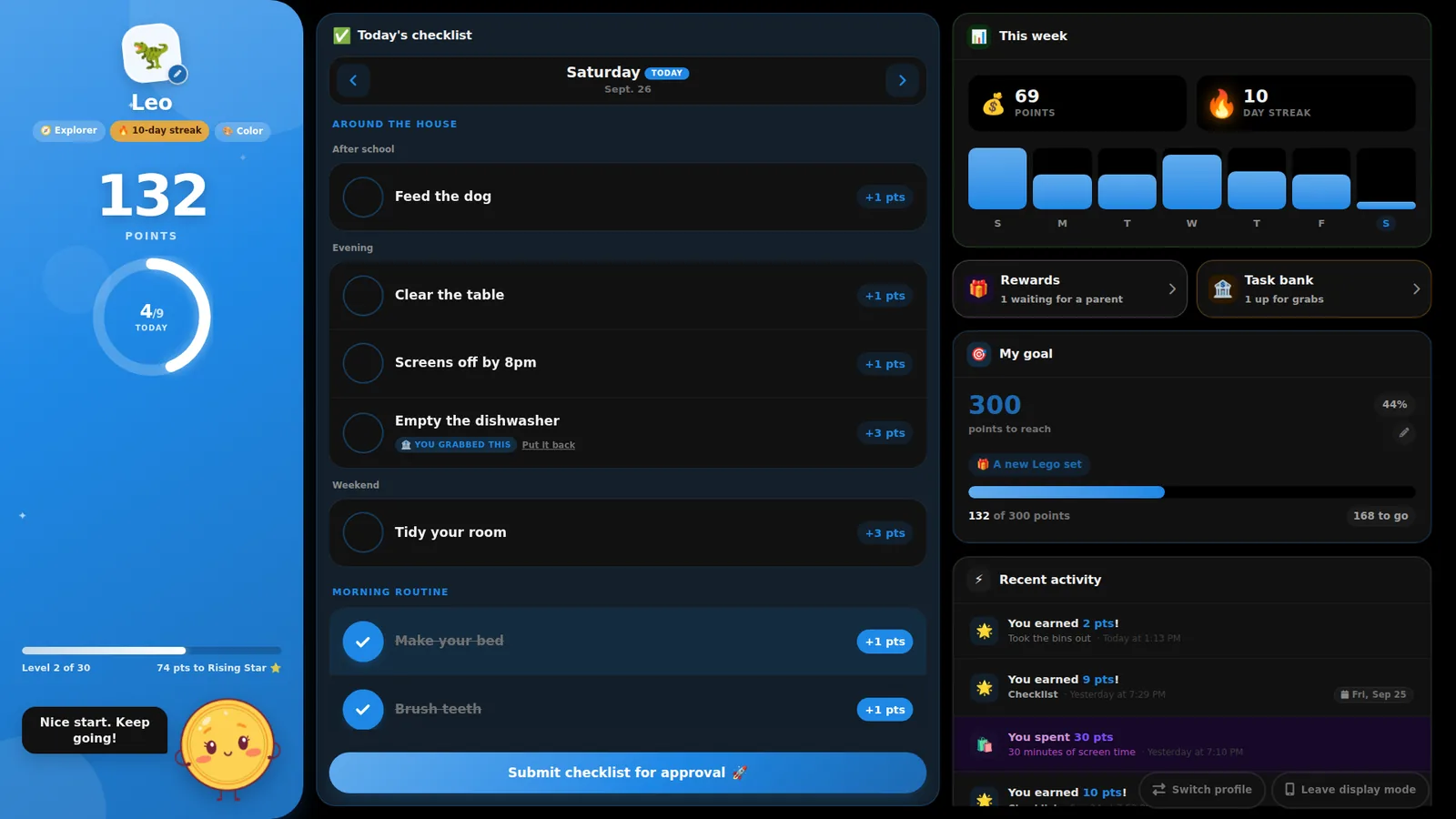
A child's dashboard filling a wall display: their point total, level and day streak down the left, today's checklist in the middle, and the week's progress, buttons for the reward shop and task bank, their point goal and recent activity down the right
A parent's phone showing the dashboard: a banner counting what's waiting for review, an Everyone row, and a card per child with their point total and Add, Deduct and Redeem buttons
How it works

You set it up once

Build the list once. Your kids do the checking, you do the approving, FamilyPoints does the counting.

The task list, grouped into Around the house, Morning routine and School, each task with a point value and an on-off switch, above a card showing the points available this week
1

Build the checklist

Add chores and lessons with point values. Group them by routine, pick which days they apply, and assign them to one kid or the whole house.

A child's daily checklist with Make your bed, Brush teeth and Homework ticked off, and a shared task marked You grabbed this
2

Kids check off their day

Each child logs in with a PIN on their own phone or the family screen, ticks tasks as they go, and hits submit when the day is done.

The submissions inbox: reward requests from Maya and Leo at the top, each with its price in points and dollars and Approve and Decline buttons, above Maya's checklist for the day
3

Approve from your phone

Turn on push and your phone buzzes the moment a checklist comes in. Approve what they actually did, send back what they didn't, and add a note. Reward requests wait in the same submissions inbox.

Kids like it. You can check it.

A child's dashboard showing a big point total, an Explorer level badge, a 10-day streak, a ring counting four of nine tasks done today, and a bar of progress to the next level
For kids

Streaks and levels keep them coming back

Every child gets their own dashboard with a big point total, a weekly chart, a day streak to protect, and 30 levels to climb from Rookie to Infinity. Pointy the mascot cheers them on.

  • Pick an avatar and a color, log in with a 4 to 6 digit PIN
  • Levels are based on points earned, so spending never demotes
  • Confetti when they send their day in
A child's goal card: 300 points to reach for A new Lego set, with a progress bar and how many points are still to go
For kids

Saving up for something makes the list mean more

Pick a number of points and what they're for, and the checklist stops being an abstract chore and starts being a Lego set that's a third paid for. Either side can set the goal: a parent from Settings, a child right from their own dashboard.

  • Progress tracks their actual balance, so redeeming points moves the bar back down
  • Say what it's for and it shows on the card until they change it
  • No goal set yet? The card just invites them to pick one
A child's screen showing the Submit checklist for approval button above a Task bank card offering Take the trash out for 2 points with a Grab it button
Siblings

Shared chores, claimed not assigned

Put a chore in the task bank instead of on everyone's list. The first kid to grab it is the only one who can earn it, so "I thought you were doing it" stops being a conversation.

  • Grab it and it moves onto your checklist; put it back and it returns to the bank
  • Daily and weekly chores come back up for grabs each period
A child's reward shop: 30 minutes of screen time approved with a note, Pick the family movie waiting for a parent, an Ice cream trip with an Ask for it button, and a Lego set marked as their goal
Reward shop

A reward shop they can actually shop from

Stock it with the rewards you're happy to give, like screen time, picking the movie or an ice cream trip. Kids ask from their own dashboard, their points go on hold, and you say yes or no from your phone.

  • Only what they can afford can be asked for; everything else shows how many points to go
  • One tap turns a reward they're saving for into their goal
  • Held points can't be spent twice, and nothing leaves their balance until you approve
The reward budget page: a $40 monthly budget worked out to 25 points to the dollar, with projected spend, worst-month spend, points already banked, and reward prices from $1 to $20
Rewards

Tell it your budget. It prices the points.

Say what you can spend on rewards each month and FamilyPoints works out what a point should be worth, based on what your kids actually earn. Then every reward is priced for you, before you promise anything.

  • See what a month costs you at that rate, and the worst case if everyone does everything
  • Know what today's balances would cost if the kids cashed out tonight
  • Every reward in the shop shows its price in dollars as well as points
  • Leave it off and points just mean whatever you say they mean
The analytics overview: points earned, deducted and redeemed over seven days, each compared with the period before, above a per-day chart split by child and a breakdown of where the points came from
For parents

See what's actually changing

Tag points as you give them and the analytics tell you whether bedtime is getting better or you just feel like it is. Every number is compared with the period before.

  • Points earned per day, per child, over 7 or 30 days
  • Awards against deductions for each behavior you track
  • Open any tag for a week-by-week trend
The recent activity feed and the Share panel: a view-only link and a child login link, each with a Copy button, and a Create an invite button for another family member
Whole household

Two parents. Grandparents. The babysitter.

Send an invite link and that adult joins your family and can award points. Give grandparents a read-only link so they can follow along without an account, or leave it open on the kitchen screen.

  • Every action shows who did it, so nothing gets double-counted
  • A push or an email when a checklist is submitted, or neither
  • Each family's data is private to the people you invite

The screens behind the day

The pages you'll open every week, and the couple you'll set up once and forget about.

The transactions page: filter chips for each child and for earned, deducted and redeemed, above a color-coded history of every point with who gave it and why
Every point, on the record Filter the whole history by child, by behavior, or by earned, deducted and redeemed. Open a day to see the tasks behind it, or download any view as a spreadsheet.
The Add Points screen for Leo: a points stepper, a row of behavior tags including Bedtime, Chores and Kindness, and a box for the reason
Award it in a few taps Add, deduct or redeem from the dashboard, tag it with the behavior, and leave a reason your child can read back later.
The Bedtime trend page: awards and deductions counted week by week since June, with a bar for each week and a summary for each child
One behavior, week by week Open any tag and see whether bedtime is genuinely getting better: awards against deductions, every week since you started.
The Rewards page: six rewards from 30 minutes of screen time to a trampoline park, each with its price in points and dollars, who can ask for it and how often it's been redeemed
Stock the shop once Add a reward, pick an icon, price it in points or dollars, and choose which kids can ask for it. Requests come to your submissions inbox.
The year in review: points earned, deducted and redeemed and checklists handed in for the year, each with a month-by-month line, above a card per child
The year, child by child Points earned, longest streaks, best months, rewards bought and levels climbed. Built for printing at the end of the year.
The Automatic points page: 5 points every Sunday for each child and a weekday award for Maya, each with a switch to pause it and the date it last landed
Allowance that runs itself Automatic points arrive daily, on weekdays, weekly or monthly, so pocket money isn't one more thing to remember.
The family settings page: Mom and Dad listed as members, Leo and Maya each with a PIN set, and switches for email notifications and the light or dark theme
Family, kids and PINs Add a co-parent, set each child's PIN, pick a theme, and get to your budget, tags and automatic points from one page.
The child login screen: The Parkers, who's checking in today, with a card for Leo and a card for Maya showing their avatars
Kids tap their own face Your family's child link opens straight to the avatars. Enter a PIN and they're in, no email address, no password, no app store.

Everything a real week throws at you

Smart schedules

Math on school days, room tidy on weekends. Tasks show up only on the days they apply, with start and end dates for a term.

Routines, not just lists

Group tasks into morning, school and evening so the checklist reads the way the day actually goes.

Weekly projection

See what each child could earn this week from the tasks you've set, before you promise a reward against it.

Push notifications

Your phone tells you the moment a checklist is submitted or a reward is requested, so approving takes seconds instead of a reminder.

Read-only view

A shareable link shows balances without a login. Made for grandparents and the kitchen tablet.

Private, and dark at night

Families are completely separate, and the whole app follows your device's light or dark theme.

I built this for my own family

We homeschool. Our day is already a list: math, reading, the dog, the dishwasher, screens off when they said they would be. I got tired of being the one holding that list in my head, and I got tired of chore apps that wanted a phone per kid and a subscription per child.

So I built FamilyPoints for us. It runs on our kitchen display, where the kids check off their day, and on our phones, where we approve it. It works on any device with a browser because that was the only way it was going to work on all of ours.

Everything on this page is a screenshot of the app my kids used this week. When something annoys us, I fix it, usually that night. If something annoys you, tell me and I'll probably fix that too.

David, who builds FamilyPoints

Pricing

One plan. The whole family.

Try everything free for 30 days. No credit card needed to start.

First 30 days free
$3.99/month

or $39.99 a year

after your free trial, for the whole family, not per child

  • Unlimited children and co-parents
  • Daily checklists, approvals and a reward shop
  • Reward budget, analytics, streaks, levels and goals
  • A year in review, and your history as a spreadsheet
  • Push notifications and automatic points
  • Read-only sharing for grandparents
  • Cancel anytime from your billing page
Start your free trial

Secure payments by Stripe. Nothing to pay until the trial ends.

FAQ

Questions parents ask

Do I need to install an app?

No. FamilyPoints runs in the browser on any phone, tablet, laptop or family display. Add it to your home screen and it opens like an app, with nothing to update and nothing to install on your kids' devices.

Will it work on our kitchen display?

If the screen has a web browser, yes. The kids' view is built to be read from across a room. We use it on a Cozyla display at home. There's a whole page about setting it up on a family screen.

Is it built for homeschool families?

That's who I built it for. Schoolwork and chores live on the same checklist, tasks can run on the days you choose, and terms can have start and end dates. Here's how homeschool families use it.

Does each child need an email address?

No. Kids open your family's link, tap their avatar and enter a 4 to 6 digit PIN. There are no child accounts and no email addresses for children anywhere in the system. You set and reset PINs from the settings page.

How do I know when a kid submits their day or asks for a reward?

Your phone gets a push notification, an email, or nothing at all: your choice. Push works on Android and on iPhone once you've added FamilyPoints to your home screen, which is Apple's requirement rather than ours.

How do I decide what a point is worth?

Tell FamilyPoints what you can spend on rewards each month and it works out a rate from what your children actually earn, then prices every reward in dollars. You can also ignore money entirely and let points just be points.

How do kids spend their points?

In the reward shop on their dashboard. You list the rewards and their prices; they ask for anything they can afford, the points go on hold, and you approve or decline from your submissions inbox. Approving records the redemption for you. You can still redeem points by hand from the dashboard too.

Can two parents award points?

Yes, and so can a grandparent or a nanny. Send them an invite link and they can join. Every award shows who gave it and why, and there's no extra charge for more adults.

What if my kids are too young for a phone?

Award points yourself from the parent dashboard with Add, Deduct and Redeem, or leave the kids' view open on a shared tablet or family screen. Nothing requires a child to own a device.

What happens when the free trial ends?

Your family, kids, tasks and history stay exactly as they are. Subscribe to keep going, and cancel anytime from your billing page.

Can we take our history with us?

Yes. Download your whole point history as a spreadsheet from the Transactions page at any time, including after a trial ends or you cancel. It's your family's record, not ours.

Is it just for chores?

Chores, schoolwork, reading, instrument practice, screens off on time, kindness to a sibling. Anything you want more of can earn points, and anything you want less of can cost them. You set the rules.
Start tonight's checklist

Create your family, add your kids, and hand them their first checklist in about 2 minutes. Free for 30 days.

Create your family